Transform your phone into the ultimate mirror. Convenient! Tap the mirror area to toggle the menu.
Watch the tutorial video to learn how to use it.
[ Tomorrow, I will meet ... me ... yesterday. ]
Mirror + Selfie Camera (best free mirror app)
Turn your phone into a flawless smart mirror.
Handy!
Tap the mirror area to show or hide the menu.
[Quick Mirror Camera Guide]
When the app starts, it hides all menus—just like a real mirror.
Adjust settings with these steps:
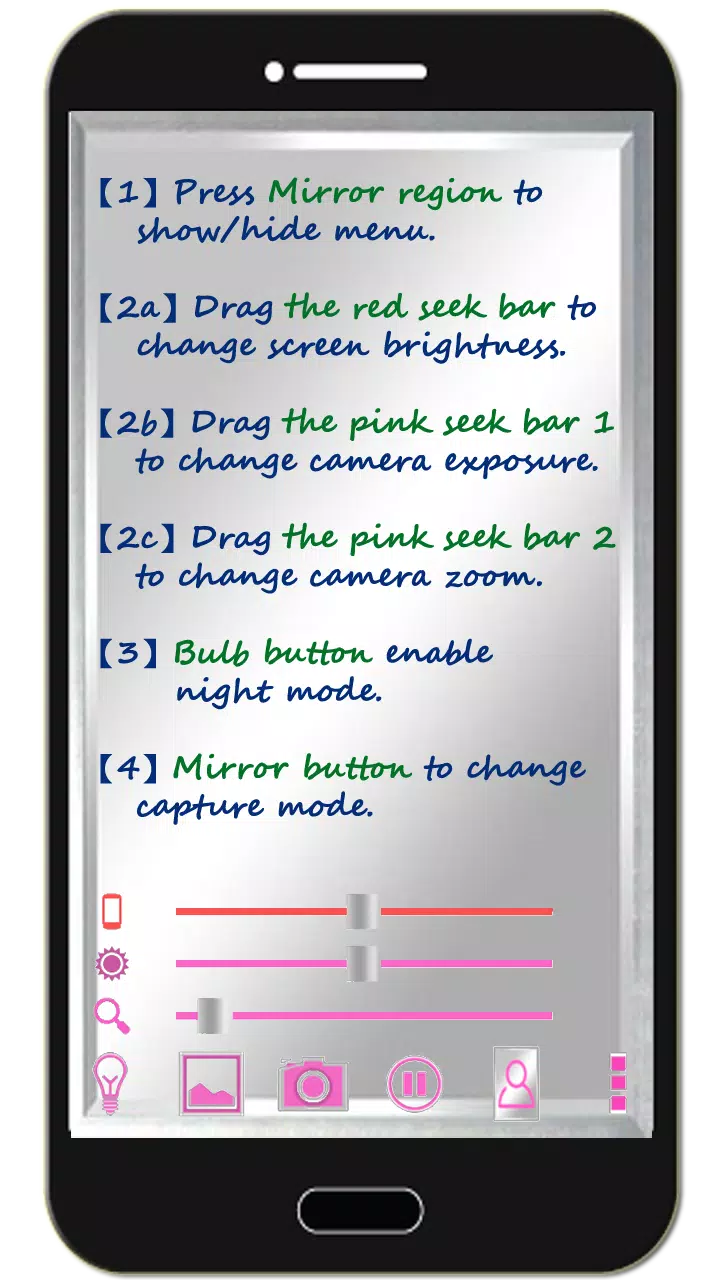
1. Tap the mirror area to toggle the menu.
2. Slide the red bar to adjust screen brightness.
3. Slide the first pink bar to control camera exposure.
4. Slide the second pink bar to zoom the mirror in or out.
5. Tap the bulb button to enable/disable night mode.
6. Tap the mirror button to switch capture modes ("Image on Mirror" or "Your Real Image").
7. Tap pause/resume to freeze/unfreeze the preview. Double-tap the frozen image or pinch to zoom.
8. [Volume Keys] : Press volume-down to freeze/unfreeze. Press volume-up to capture. More options are available in settings.
[Additional Features]
1. Capture or edit mirror photos anytime.
2. Night Mode : Tap the bulb button to activate edge lighting.
3. The screen stays on during use. Auto-exit after 10 minutes of inactivity to save battery.
【Recommended External Photo Editor】
( Line Camera )
https://play.google.com/store/apps/details?id=jp.naver.linecamera.android
This app offers seamless compatibility and user-friendly photo editing.
Alternatively, use your device's built-in editor (tested on Samsung).
【PS】
Support us with a Facebook like!
https://www.facebook.com/jkfantasy
What's New in Version 1.6.0
Last updated on May 26, 2020
V1.6.0:
1. Minor bug fixes.